An emergency contact serves as a readily accessible point of contact to be reached in critical situations. It plays a pivotal role in scenarios where an employee is absent from work without prior notification. In such instances, managers or administrators may need to swiftly access the designated emergency contact provided by the employee.
The essence of an emergency contact lies in its ease of accessibility, especially during urgent circumstances. Valuable time cannot afford to be squandered sifting through physical files or cabinets to retrieve essential contact information.
Within the framework of an organized system, the Emergency Contacts tab offers a streamlined approach for adding and viewing emergency contacts when the respective employee is unavailable. This ensures efficiency and professionalism in managing unforeseen events while upholding the safety and welfare of all stakeholders.
Add Emergency Contact
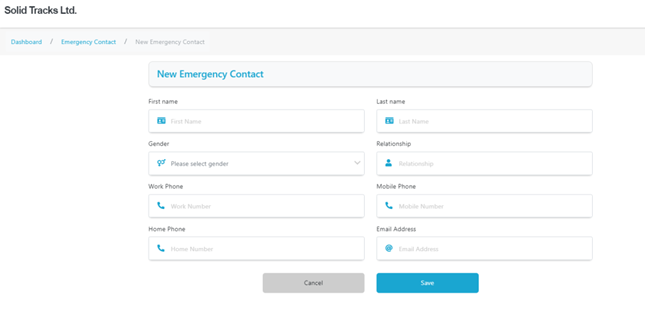
To initiate the addition of a new Emergency Contact, simply navigate to the top right of the page and click on the ‘Add Emergency Contact’ button. This action will prompt the opening of a new page where you can meticulously input all pertinent details of the new contact.
You’ll be prompted to furnish essential information including First Name, Last Name, Gender, Relationship to the employee, along with contact details such as Work Phone, Mobile Phone, Home Phone, and Email Address. By completing these fields diligently, you ensure that crucial contact information is readily available during times of need, fostering a proactive approach to emergency management.
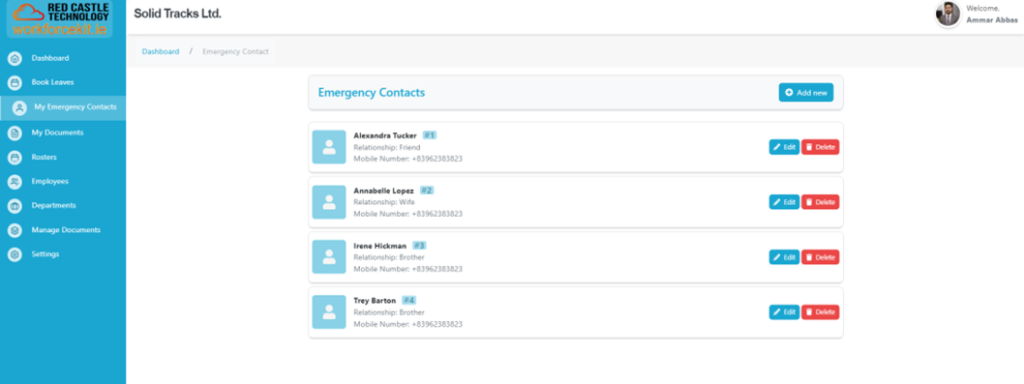
Upon successfully adding an emergency contact, the system seamlessly redirects you to the ‘My Emergency Contacts’ tab, where you can conveniently view the newly entered details alongside the associated first name, last name, relationship, and mobile number.
Furthermore, within this tab, users are empowered with the flexibility to both delete and edit emergency contact entries as needed. This functionality ensures the maintenance of accurate and up-to-date contact information, thereby enhancing the efficacy of emergency response protocols.