
This section is dedicated to Managers and HR personnel, facilitating the seamless upload of new documents and their assignment either to all employees or specific departments.
The ‘My Documents’ tab provides an intuitive interface for document review, ensuring ease of access and clarity for all users. Upon assignment, employees receive email notifications, alerting them to new documents awaiting their attention.
This streamlined process enhances communication and ensures timely dissemination of important information, contributing to a well-organized and efficient workflow within the organization.
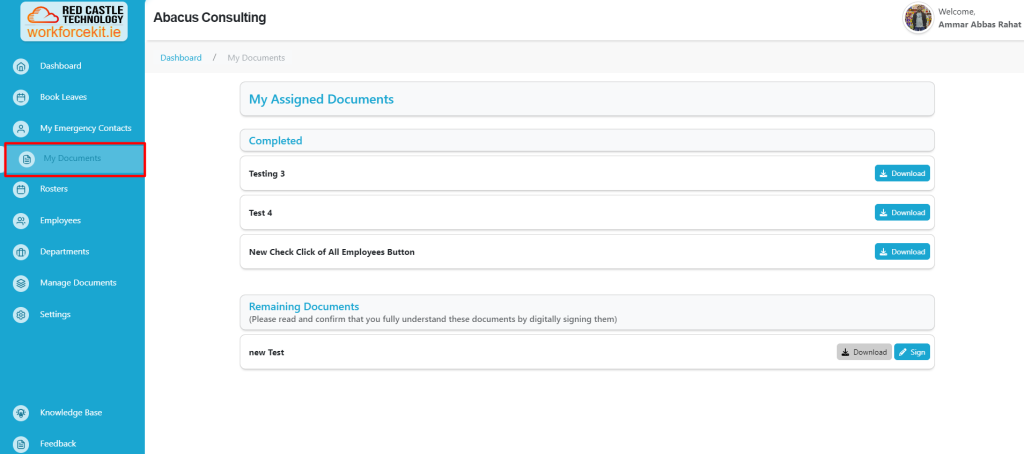
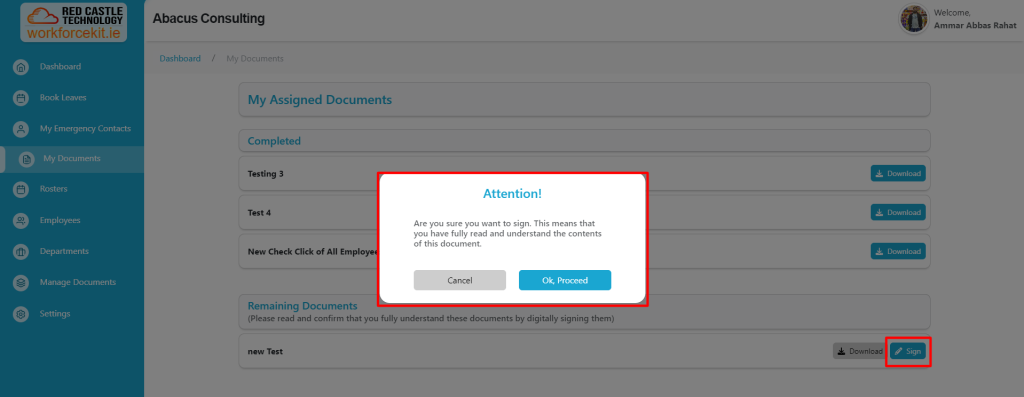
Upon receipt of a new document, users are required to confirm their understanding by engaging with the “Sign” button embedded within the document interface. Upon selecting the “Sign” button, a prompt will appear, requesting affirmation: “Are you sure you want to sign. This means that you have fully read and understand the contents of this document.” This action signifies complete comprehension and acknowledgment of the document’s contents. Users may proceed by selecting “Ok, proceed” to affirm their understanding or opt to cancel the action at their discretion.
Documents may include the employee handbook, company policies, or similar materials. Once acknowledgment of the task is confirmed, employees gain access to the document for download by selecting the “Download” button.